When autopay turns convenience into silent spending
Most months, the transactions look clean: bills paid on time, no late fees, no awkward “did we remember that?” moments. Then a card gets replaced, the autopay links get reauthorized, and the baseline quietly resets. The charges are rarely alarming on their own—$12.99 here, $4.99 there—but the timing makes them hard to “feel,” especially when cash flow is healthy and statements are skimmed between meetings.
Autopay works best for obligations you’d fight to keep (mortgage, utilities, insurance premiums). It works worst for things that won’t break tomorrow if they lapse. The friction disappears, so the decision disappears, and the product starts living on habit instead of use. The constraint is simple: the cost is real, but the moment of reconsideration never arrives.
A quick check is to sort the last 60–90 days by merchant and look for repeats, then convert each to an annual number. A $19.99 subscription isn’t “twenty bucks”; it’s roughly $240 a year, and three or four of those can rival a meaningful savings goal. From there, label each recurring charge as “must-pay,” “nice-to-have,” or “not sure,” and put the “not sure” ones on a one-cycle pause so the inconvenience shows up before the renewal does.
The gym membership that becomes a guilt tax

It often starts with a reasonable story: a “low” monthly rate, a nicer facility close to home, maybe a corporate discount. Then schedules tighten, travel picks up, a kid’s activity takes the early evenings, and the check-ins drop to once or twice a month. The membership stays on autopay, not because it’s delivering value, but because canceling feels like admitting something about priorities. The constraint isn’t the price tag—it’s the emotional friction of making a clean decision.
Run it like a usage review, not a motivational speech. Pull the last 90 days of gym visits (most apps show this) and calculate cost per visit. A $79/month plan used four times is about $20 per workout; if that number is higher than a day pass or a boutique class you’d actually attend, the “deal” has inverted. Add the annual view: initiation fees, “facility” surcharges, and the odd personal training session can push the real cost well past what you’d guess from the headline rate.
From there, the trade-offs get clearer. If the gym is your primary stress outlet, keep it—but downgrade to a cheaper tier, remove add-ons, or switch to a plan with easier freezes. If it’s mostly insurance against becoming inactive, consider replacing it with a smaller commitment: a punch card, a community center, or a basic home setup. The goal is to stop paying for an identity and start paying for access you’ll use this month.
Streaming stacks that outgrow your actual evenings
After the gym math, streaming is where the numbers get slippery. The charges don’t feel like “subscriptions” so much as background utilities, and they’re scattered: the main service on a card, the kids’ add-on billed through an app store, a premium upgrade tucked into a bundle. The constraint is timing—each platform renews on its own day—so there’s never a single moment where the total asks to be justified.
A useful way to review it is to separate “catalog access” from “habits.” Look at the last four weeks of actual viewing across the household (most apps show watch history) and be honest about peak capacity. If weekday nights are mostly short episodes and weekend time is inconsistent, paying for five full libraries is usually excess. Convert it to an annual number and add the hidden layers: ad-free tiers, 4K, extra profiles, and channels inside channels. A $6 upgrade is still $72 a year.
The cleaner decision is often rotation, not elimination. Keep one or two “always-on” services that match your default evenings, then cycle the rest quarterly so you binge intentionally and cancel before the second renewal. The friction to plan the switch is real, but it’s smaller than paying $800–$1,200 a year for options you don’t realistically have time to use.
Credit card annual fees you rarely earn back
After you’ve trimmed the obvious subscriptions, the next surprise is often a single line item that doesn’t show up monthly: a $95, $250, or $550 annual fee that quietly posts and gets absorbed into an otherwise normal statement cycle. The pitch is “it pays for itself,” and for a while that can even be true. Then spending shifts, travel slows, a new employer changes reimbursement, or the family’s routines move from airports to carpools. The constraint is that the fee is fixed, while the value is conditional.
Review it like a benefits ledger, not a brand loyalty test. Start with the easiest credits to verify: airline incidental, rideshare, streaming credits, hotel credits. If you had to buy something you wouldn’t normally purchase just to “use the credit,” count only the portion you would have spent anyway. Next, price the perks you actually used: lounge visits (at what you’d pay for day passes), free checked bags (based on real flights taken), and travel protections (only if they replaced separate insurance you stopped buying).
Then compare the net value to a no-fee or low-fee alternative in your wallet. If the math is close, friction becomes the deciding factor: does the card simplify travel and protections enough to keep, or is it an annual reminder to chase coupons? Downgrading to a no-fee version often preserves account history while eliminating the “prove it” fee for another year.
Extended warranties and device insurance that disappoint
Once the annual-fee math is done, the next “small” cost that hides in plain sight is protection you barely remember buying. It shows up as a monthly device plan on a wireless bill, a retailer warranty on a laptop, or a credit-card-billed add-on that sounded prudent at checkout. The constraint is that the premiums feel manageable, but the claim process—deductibles, exclusions, repair networks, waiting periods—doesn’t show up until something breaks and the clock is already ticking.
Run a simple expected-cost check using your own history. Add up what you pay per device per year, then compare it to the realistic downside: what would a screen replacement cost after the deductible, and how often has that actually happened in your household? Many plans are effectively “pre-paying” for a low-probability event, and the most common outcomes are either no claim at all or a claim that still costs $99–$250 plus time without the device.
The disappointment is usually administrative, not mathematical. If the plan requires shipping, a long repair window, or a refurbished replacement you wouldn’t choose, the convenience premium isn’t being earned. A cleaner alternative is often self-insuring: keep a small “device replacement” buffer, and reserve paid coverage for the few items where a sudden $800–$1,200 hit would genuinely stress cash flow.
A quick audit that reveals what you truly use
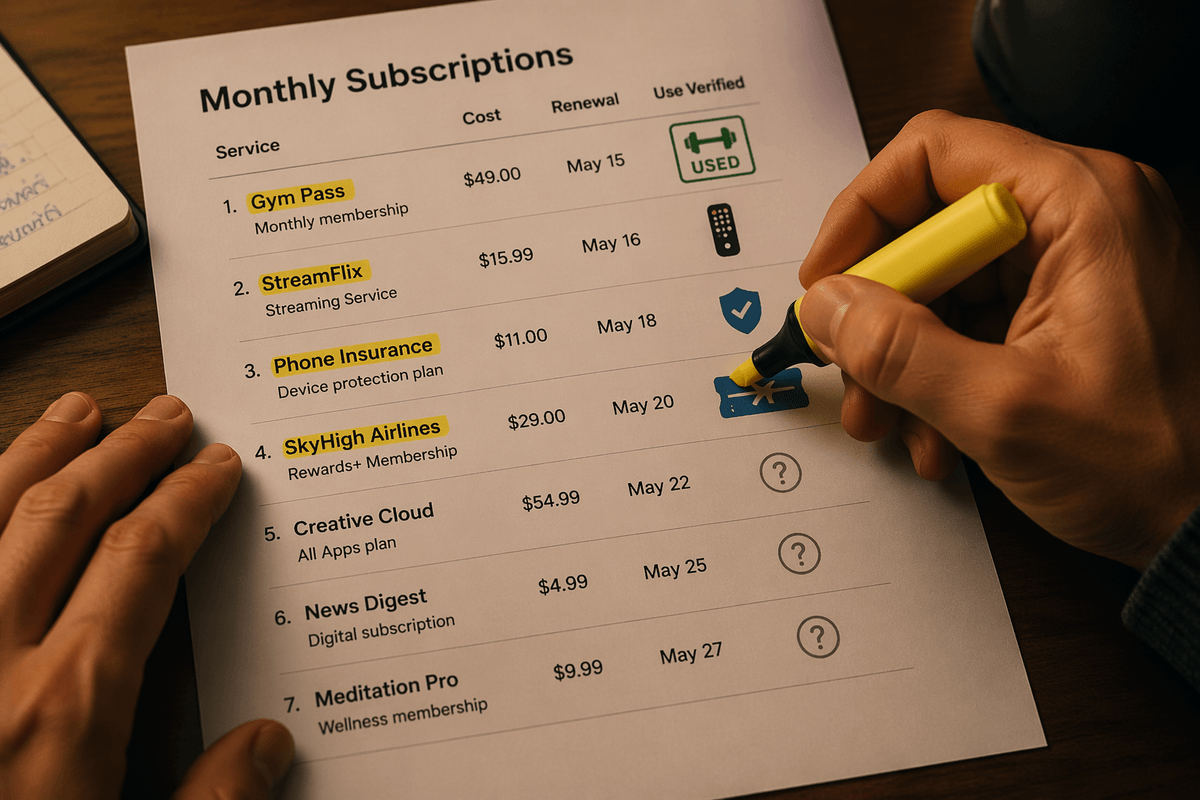
At this point the pattern is consistent: the waste isn’t dramatic, it’s dispersed. The quickest way to surface it is a 30-minute “recurring spend” export—last 12 months from every card plus the app store and wireless bill—then group by merchant and normalize to annual cost. The constraint is completeness; one missing account hides the real total.
Next, add one usage signal beside each line: gym check-ins, streaming watch history, device claims, airline credits redeemed. If you can’t find a usage record in two minutes, mark it “unverified” and treat the value as $0 for now. The constraint is time, so the rule has to be strict.
Then assign a decision date and a replacement plan (downgrade, rotate, or self-insure) before the next renewal hits.
Keeping convenience without paying the inertia fee
With the list labeled and renewal dates visible, the goal shifts from “cut everything” to keeping the few conveniences that actually reduce friction. A clean rule is to cap “inertia spending” at a fixed monthly ceiling (say 1–2% of take-home pay), then force anything above it to justify itself in writing before the next charge posts. The constraint is behavioral: without a cap, the defaults slowly creep back.
Lock the decisions in with lightweight systems. Use annual billing only for services you’d keep even if prices rose 20%, and move the rest to a single “subscriptions” card with transaction alerts so new add-ons can’t hide. For anything you rotate, set a calendar reminder one week before renewal and cancel immediately after the binge. Convenience stays—but it stops being automatic by accident.